WASticker-Sticker for WhatsApp
- 4.4
- Rating
- 10.00M
- Installs
- Free
- Price

 Analysis by App-foxy
I spent time using WASticker-Sticker for WhatsApp as a lightweight way to decorate WhatsApp conversations, and its appeal is easy to understand: it focuses on stickers rather than trying to become a full messaging tool. If you enjoy replying with expressive images instead of another line of text, this app gives you a simple place to browse sticker material and add it to your chats.
It belongs to the comics category, is developed by Office Tools, and is free to install. That last point matters because the app’s value is straightforward: you can explore its sticker-focused content without paying an entry fee. I would not approach it as a complete design studio or as a replacement for WhatsApp. Its role is narrower, and it works best when you want a quick visual response ready for a conversation.
How the sticker experience fits into everyday chats
The first thing I noticed is that the app makes more sense when used alongside WhatsApp than when treated as a destination by itself. A typical session is not about spending a long time inside the sticker app. Instead, I would open it when I wanted something more playful than an emoji, look through the available material, and then use the selected sticker in a chat where the tone suited it.
You May Also Like

 AccuWeather: Weather Radar
AccuWeather Review: A Quick, Clear Forecast for Everyday Decisions
For everyday plans, the best forecast is the one you can understand quickly. AccuWeather makes rain timing, radar, and local conditions easy to act on, with a few trade-offs.

 Hill Climb Racing
Why Hill Climb Racing Still Turns Crashes Into One More Run
A tiny car, a bumpy hill and one more upgrade: Hill Climb Racing keeps resurfacing because its simple chaos makes every near-miss feel personal.

 AliExpress - Shopping App
AliExpress Makes Global Shopping Feel Personal, but Shoppers Bear the Risk
AliExpress turns a global marketplace into a pocket-sized discovery engine. Its reach is useful, its shopping loop compelling, and its trade-offs easy to miss.

 Lords Mobile: Kingdom Wars
Lords Mobile Is a Kingdom-Building Routine, Not a Quick Match
A case-by-case verdict on the building, battles, device demands, and social commitments that make Lords Mobile rewarding for some players and exhausting for others.

 PDF Scanner app - TapScanner
TapScanner Makes Paperwork Easier to Capture, Check, and Share
TapScanner makes scanning with a phone feel less like a rescue operation and more like a dependable step in getting work done. Its capture tools are useful, though not flawless.

 Block Blast!
Block Blast! Shows How Much a Puzzle Game Can Leave Out
A quiet grid game shows why puzzle players increasingly value instant clarity, repeatable skill and low-pressure play—and where the genre still needs to catch up.
More From Our News Desk
View All News


That makes it useful for small moments. A friend sends a joke, a family group shares good news, or someone asks whether I am on my way. A sticker can answer with humor or emotion without forcing me to write a full response. In those situations, the app adds variety to conversations that might otherwise rely on the same familiar emoji set.
The store summary presents it as a tool for decorating WhatsApp chats with sticker maker and WASticker-style content. In practical terms, that tells me the app is aimed at people who want WhatsApp-compatible sticker material, not at readers looking for comic books, drawing lessons, or a general image editor. Keeping that distinction in mind prevents disappointment.
I also found that its usefulness depends heavily on how often I actually use stickers. Someone who sends them several times a day will notice the convenience more quickly than someone who prefers plain text. The app does not need to transform the way you communicate; it only needs to make visual replies easier to reach.
What the free access means for value
Because the listed price is free, the basic decision is not whether the sticker collection justifies a purchase. The real question is whether the time spent browsing and organizing sticker material is worthwhile for your messaging habits. For regular WhatsApp users who like expressive replies, free access makes experimenting easy and keeps the risk low.
I would still separate “free to install” from “perfect for everyone.” A free app can be inconvenient if its selection does not match your sense of humor, if browsing feels repetitive, or if you only send stickers occasionally. In that case, the monetary value is obvious, but the practical value may be modest.
The app has reached more than ten million installs and carries an average rating of 4.4 from roughly twenty-one thousand ratings. Those figures suggest that the general idea works for a substantial audience, although they do not guarantee that every sticker style will suit you. I treat that popularity as a reason to try it, not as proof that it will fit every chat.
It is also marked for a Teen audience. That is useful context for families and younger users, but I would still judge individual stickers before sharing them in mixed-age groups. A general content label does not replace personal discretion, especially in family chats, school groups, or work conversations.
Where it is more useful than the usual alternatives
The most obvious alternative is WhatsApp’s built-in emoji and sticker selection. Those tools are convenient because they are already inside the conversation, so they win when I need an instant reaction and do not care about variety. WASticker-Sticker for WhatsApp has a clearer advantage when I want to expand beyond the default choices and keep a more playful set available.
Another alternative is a dedicated sticker-making application. A maker is the better choice if I want to turn my own photos, drawings, or carefully edited images into personal packs. This app is more suitable when I want ready-to-use material without beginning every sticker from a blank canvas. That saves effort, but it also means I have less control over originality and style.
There is a third option: downloading individual sticker packs from scattered sources. That can provide more variety, but it often creates a messy workflow. A focused sticker app is easier for someone who would rather browse in one place than search repeatedly for compatible packs. The trade-off is that convenience depends on the app’s organization and the range of material it presents.
For people who want polished custom branding, detailed editing, or a personal illustrated identity, I would choose a stronger creation tool instead. This app is not the right recommendation for designing a business mascot, preparing promotional artwork, or building a carefully curated professional pack. Its strength is casual communication, not advanced production.
Small workflow improvements that make a difference
My first practical tip is to choose stickers by conversation type rather than collecting everything that looks amusing. A small group for greetings, reactions, apologies, congratulations, and jokes is easier to use than an enormous unsorted collection. When a chat moves quickly, finding the right tone matters more than having endless options.
A second useful habit is to test a sticker in a low-stakes conversation before using it in a work or family group. Visual humor can be less clear than text, and a gesture that feels friendly among close friends may look sarcastic elsewhere. I found that treating stickers as tone-setting tools, rather than automatic substitutes for words, led to fewer awkward replies.
A third consideration is timing. If I am answering a practical question, I send the necessary information first and add a sticker afterward. A sticker can soften a message, but it should not hide the answer. This is especially helpful in group chats, where several people may be scanning quickly and need the important detail immediately.
I also recommend keeping the app’s role separate from image storage. If a sticker is genuinely important to you, do not assume that casual access is the same as a personal archive. Save or organize anything you care about through the options available on your device and messaging setup. That way, a change in your phone or chat habits does not leave you searching from scratch.
Trade-offs I noticed while using it
The biggest trade-off is convenience versus control. Ready-made sticker material is faster than designing your own, but it cannot reflect a private joke, a specific friend group, or a precise visual idea as well as a custom image can. If personalization is your main goal, a sticker maker will probably feel more satisfying.
Browsing can also become less valuable once you have found a few favorites. The initial discovery is enjoyable, but repeated use depends on whether the available selection continues to feel fresh for you. I would not install it expecting an endless stream of perfectly matched reactions. I would install it expecting an accessible extra layer for WhatsApp conversations.
There is also a social trade-off. Stickers are expressive, but they can be ambiguous. A laughing image might mean genuine amusement, embarrassment, or an attempt to end a conversation lightly. When the subject is sensitive, I prefer a clear sentence and use the sticker only as a small addition.
The app’s current version is 3.4.5, and it supports devices running Android 7.0 or later. That makes it relevant to users with older compatible Android phones, although the experience will still depend on the individual device and how smoothly it handles WhatsApp alongside other apps. I would check compatibility before planning to use it on an especially old handset.
It was released on May 6, 2019, so this is not a brand-new concept. I see that as both a positive and a limitation: the idea is familiar and easy to understand, but users seeking a modern, highly customizable creative workspace may find the concept too narrow. Its longevity supports the basic use case without changing what the app is designed to do.
Who is likely to get the most value?
I would recommend it first to people who already use WhatsApp frequently and enjoy communicating through reactions, memes, comic-style images, or playful visual cues. It is especially convenient for users who want more choice than the standard emoji keyboard provides but do not want to spend time creating every sticker themselves.
It can also suit families and friend groups with recurring jokes. In that setting, the value comes from having quick visual responses ready when a conversation becomes informal. A sticker can acknowledge a message, celebrate a small win, or make a routine exchange feel less mechanical.
Casual chat users may appreciate the low commitment. Since the app is free, trying it does not require a purchase decision, and uninstalling it later is simple if it does not become part of your routine. I would describe that as practical value rather than guaranteed value: the app earns its place only if it saves you effort or adds enjoyment.
I would skip it if I rarely use WhatsApp stickers, dislike browsing ready-made content, or need exact control over image design. People who want to create personal packs from photographs, produce polished artwork, or maintain a professional visual style should look toward a dedicated editor or sticker-creation tool instead.
I would also skip it for serious communication where clarity matters more than mood. A sticker may be a nice closing touch, but it is not a substitute for directions, scheduling details, customer support information, or an apology that needs to be understood precisely.
My recommendation before you commit to using it
Start with a specific purpose rather than installing it simply because you like the idea of stickers. Decide whether you want quick reactions, comic responses, greetings, or a way to make group chats livelier. Then judge the app by how easily it supports that one purpose. This approach makes it easier to notice real usefulness instead of collecting material without ever sending it.
Give yourself a short trial period in normal conversations. Try a few different tones, see whether the available choices feel natural, and notice whether reaching a sticker is faster than using WhatsApp’s existing options. If the app helps you answer more expressively without interrupting your chat flow, it has earned a place on your phone.
If you are comparing it with a paid sticker pack, the free price gives this app an immediate advantage for experimentation. If you are comparing it with a custom maker, the decision is less about cost and more about priorities: speed and ready-made content here, personal control and originality there. That is the clearest way to understand its position.
My final view is positive but specific. WASticker-Sticker for WhatsApp is worth trying for frequent WhatsApp users who want more visual personality without paying for access. Its value comes from convenience, not from advanced editing or guaranteed artistic quality. I would recommend it to casual sticker fans, while pointing creative users toward a dedicated maker and infrequent sticker users toward WhatsApp’s built-in choices.
With a 4.4 average and a large installed audience, it has clearly found a practical use case, but popularity should not replace your own test. Install it, look for the kinds of reactions you actually send, and keep it only if it improves real conversations. For me, that is the right buy-or-skip verdict: there is no purchase barrier, but your time and communication style still determine whether the app is genuinely useful.
FAQs for WASticker-Sticker for WhatsApp
01What is WASticker-Sticker for WhatsApp?
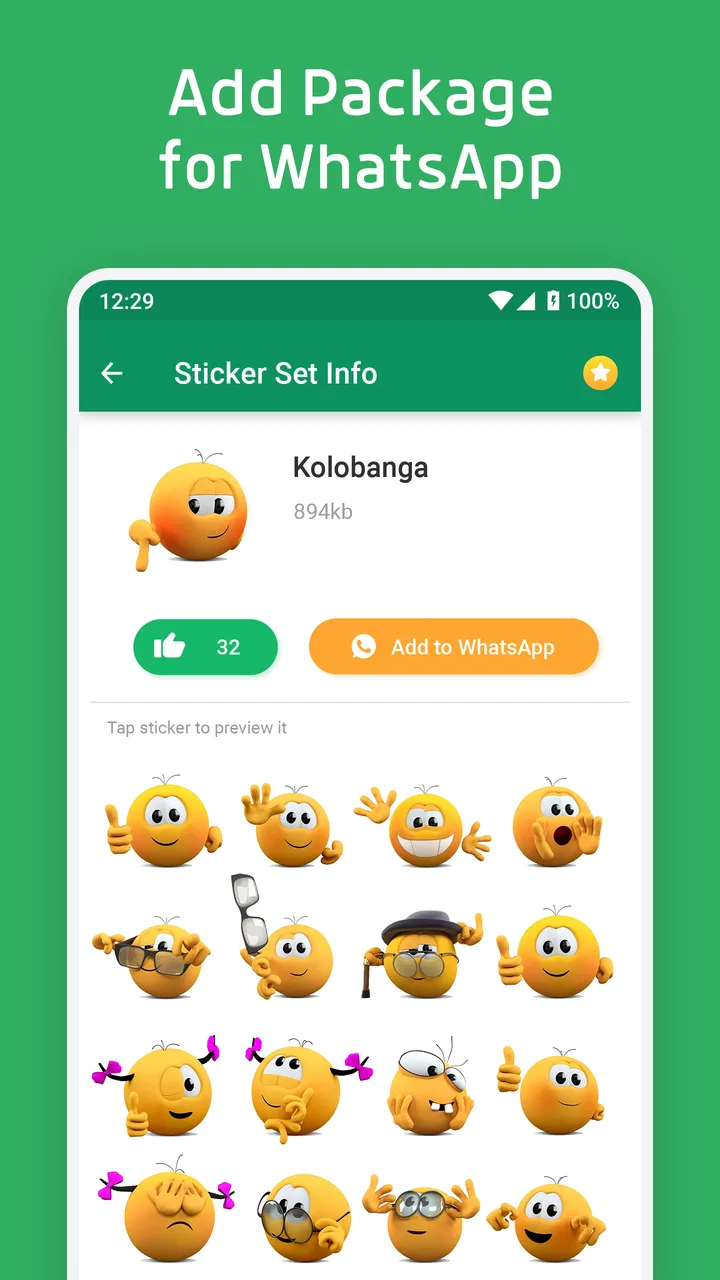
WASticker-Sticker for WhatsApp is an app that allows users to enhance their WhatsApp conversations by adding a variety of fun and expressive stickers. These stickers can range from humorous and cute to themed and seasonal, offering a personalized touch to your messaging experience.
02How do I add stickers from WASticker to WhatsApp?
To add stickers from WASticker to WhatsApp, first download the app from the Google Play Store or Apple App Store. Open the app and browse through the available sticker packs. Once you find a pack you like, tap on the ‘Add to WhatsApp’ button. The pack will then be available in your WhatsApp sticker collection.
03Is WASticker compatible with all devices?
WASticker is compatible with most Android and iOS devices that support WhatsApp. However, it’s important to ensure that your device's operating system is up to date for the best performance. Check the app’s compatibility details on the respective app store before downloading.
04Are there any costs associated with using WASticker?
WASticker offers a variety of sticker packs, some of which are free and others that may require a small fee. While the app itself is free to download, in-app purchases may be needed to access premium sticker packs. Always check the app store for any updates on pricing.
05Can I create my own stickers using WASticker?
Currently, WASticker focuses on providing ready-made sticker packs, but it does not offer a feature to create custom stickers. Users looking to create their own stickers might need to use other apps specifically designed for custom sticker creation and import them into WhatsApp separately.
Pros
- Wide variety of sticker packs.
- Easy to integrate with WhatsApp.
- User-friendly interface.
- Regular updates with new stickers.
- Lightweight and fast to download.
Cons
- Limited customization options.
- Occasional ads may interrupt.
- Some sticker packs are paid.
- Requires internet for updates.
- No option for animated stickers.

WASticker-Sticker for WhatsApp
Gallery